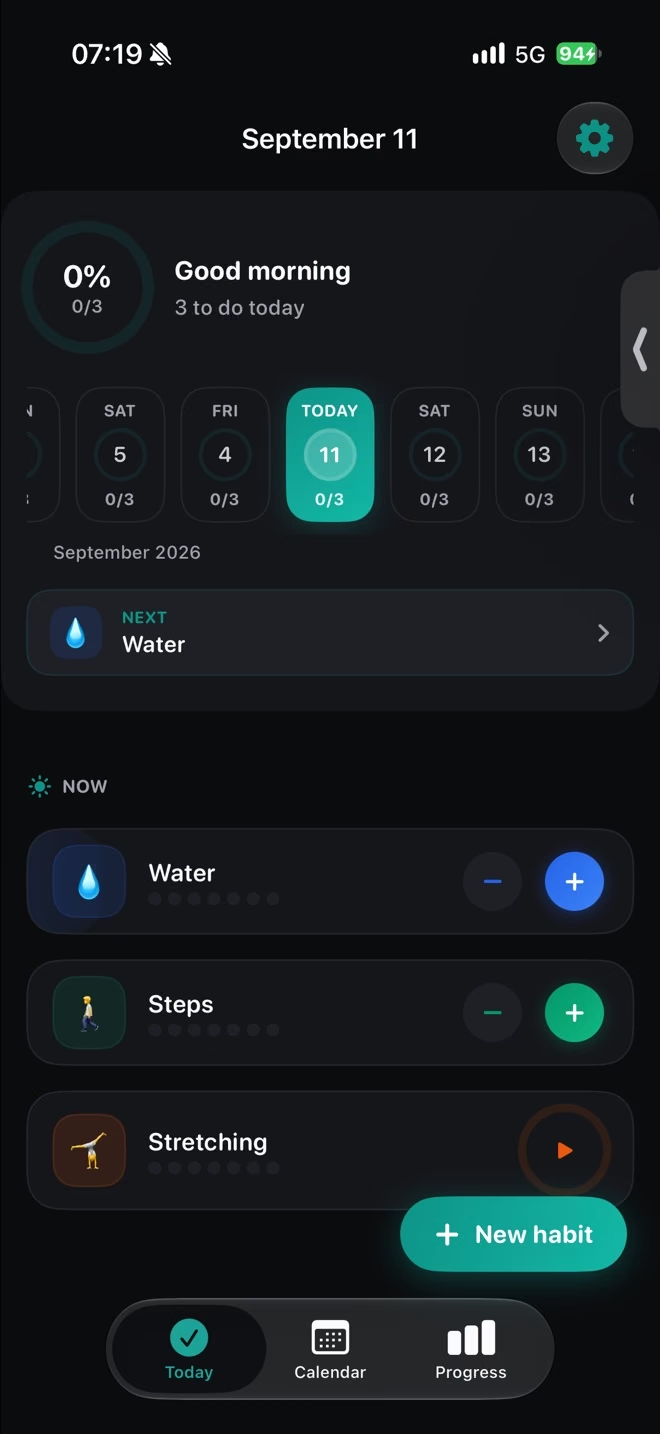
The app itself
Today list, one-tap check-off, calendar editing and swipe to reschedule. Haptics, Dark Mode, Dynamic Type — and everything works offline. The only optional network feature is iCloud sync.
Coming soon — widgets, Live Activities and a Control Center control
Most trackers punish you for days you never planned. ProperHabit counts only your scheduled days — a day off is skipped, not failed. Six habits free, no account, and nothing is sent to us — the database lives on your iPhone, and even the optional iCloud sync stays inside your own Apple account.
Prefer plain email? Write to hi@zordonintelligence.pl. Not on the App Store yet. Version 1.0.1 is prepared for review — the button opens your mail app, and we send exactly one message the day it goes live.
Traditional trackers treat every calendar day as a day you owe. ProperHabit only counts the days you scheduled.
Counts towards the streak. Done adds one. Left empty breaks the run — unless a grace day covers it.
M W F · countsNot in the schedule. Neutral: never counts, never breaks. This is what a planned rest day looks like.
Tue Thu · skippedYou planned it and it did not happen. Only this breaks the streak — which is what makes the number mean something.
Scheduled & emptyInteractive demo
Tap a weekday to add or remove it from the schedule. Tap “done” or “miss” on a past scheduled day. The streak recalculates exactly the way the app does it.
How the streak is counted
streak = 0
for day in reversed(yesterday ... Mon):
if not scheduled[day]: continue # day off
if not done[day]: break # honest miss
streak += 1
# today is still open — it never breaks the streak yet
# days outside the schedule never break it either
The aha moment: remove Tuesday from the schedule and the streak stays. Miss a scheduled Monday and it breaks. That is the whole product.
Inside the app
Real captures from the build that is waiting for review — not a rendering of it. The month shows which scheduled days held; the trend shows what that adds up to.
Swipe to see both screens
Today list, one-tap check-off, calendar editing and swipe to reschedule. Haptics, Dark Mode, Dynamic Type — and everything works offline. The only optional network feature is iCloud sync.
Real life happens. A grace day covers one missed scheduled day without touching the streak — and it is free, not a paid extra.
One slip · streak intact
Home Screen, Lock Screen and StandBy. Tick a habit without opening the app — interactive on iOS 18 and later.
Timed habits show live progress on the Lock Screen and in the Dynamic Island, with a Control Center control for the quick ones.
Focus · 24:18 − +
Premium. Reads steps, sleep and mindful minutes on the device and closes a linked habit when Health says it happened. Read-only.
No server of ours, no account, no SDKs, no cookies. Habit data sits in a local database, and our App Privacy answers declare Data Not Collected.
Six surfaces ship with the app — every one of them a way to close a habit without opening anything. All of them are in the free tier.
Name it, pick a colour and an icon, then choose the weekdays it runs on.
Not in the schedule, so it is not in the count. No red badge, no guilt copy.
The row is the button. Home Screen and Lock Screen widgets do the same without launching the app.
Another day you never planned. The streak does not notice it.
Open the Calendar, pick any day of the month and fix it. Any past day of the month stays editable.
You walked. Health reports the steps and the linked habit completes itself — a Premium feature, read-only, on device.
Three scheduled days, three completions. Progress reads 3, not 0 — and next week is already drawn.
Scroll sideways to see every row →
| Feature | Free | Premium |
|---|---|---|
| Active habits | 6 | Unlimited |
| Weekday scheduling | ||
| Grace days | One slip | One slip |
| Pause and backfill | ||
| Habit types | All 6 types | All 6 types |
| Habit score | ||
| Trend history | Last 14 days | 90 days |
| Insights | ||
| Apple Health auto-complete | ||
| CSV export | ||
| Widgets, Live Activities, Control Center | ||
| iCloud sync | Optional, off by default | |
| Ads and tracking | None | None |
Premium includes everything in Free, plus the rows above.
No dark patterns. Prices are in USD and localised by the App Store. Lifetime never expires.
$2.99/mo
For trying Premium for a month.
Best value
$19.99/yr
7 days free then $19.99
$1.67 per month, billed yearly
$34.99once
Never expires. No subscription. Future Premium features included.
Why Lifetime? One payment and the app is yours. If the price rises later, your purchase stays yours — Restore Purchases works with the same Apple ID.
One-time purchase · managed in the App Store · restorable anytime
Prices are in USD and localised by the App Store to your storefront. Subscriptions are managed in your Apple ID settings. The yearly plan includes a 7-day free trial and renews automatically unless cancelled at least 24 hours before the period ends. Lifetime is a one-time purchase and never expires. The price actually charged is the one the App Store shows you before you confirm the purchase, in your local currency and including applicable taxes; the USD amounts above are reference prices and exclude local taxes.
What if I stop paying? Nothing is deleted. You keep every habit, every completion and every streak. The app simply returns to the free limits — six habits and 14-day trends — and you can re-subscribe whenever you like.
We do not gamify guilt. No pushy notifications, no red failure marks for days you chose to rest. Your week has a shape — some days are on, some are intentionally off — and the app is built around that instead of against it.
Network inspector
Open DevTools → Network → filter by domain. Every file on this page is served from this page's own domain.
No. ProperHabit is local-first: no sign-up, no password, no email. You open the app and start. Habits live in a database on your device.
On your device. The developer runs no server for habit data, and the app ships no analytics SDK. If you switch on iCloud sync — a Premium option that is off by default — the data is mirrored to your own private iCloud database, which the developer cannot read.
They do not count and they do not break it. If a habit runs Monday, Wednesday and Friday, then Tuesday is skipped rather than failed. Only a scheduled day you leave empty breaks the run, unless a grace day covers it.
Yes, as part of Premium. It reads steps, sleep and mindful minutes on the device and can close a linked habit when Health reports the data. It never writes to Health, and the values never leave the device.
A grace day covers one missed scheduled day so your streak survives it. It is part of the free tier, not a paid extra — the app would rather absorb one slip than make the number useless.
Nothing is deleted and nothing is switched off. You keep every habit and every completion, and every habit stays tickable. The app returns to the free limits — you cannot add another habit while you are at or above six, and trends show the last 14 days.
Six types: yes or no, amount against a target, timed with a countdown, a range you want to land inside, a habit you want to avoid, and a habit you repeat a set number of times a day. Each one carries its own weekday schedule and optional grace days.
The free tier has no time limit and covers six habits. The annual Premium plan includes a 7-day free trial. Lifetime is a single payment that never expires. Every purchase is handled by the App Store.
None. No ads, no analytics SDK, no third-party frameworks, and no cookies on this website. Our App Privacy answers declare Data Not Collected — you can read that label on the App Store page the day the app goes live. Every asset on this page comes from this page's own domain, so you can check that right now.
Version 1.0.1 is prepared for App Review and nothing is downloadable yet. Leave your email and we will send one message the day it goes live — no newsletter, no drip sequence.
It is an iPhone app: iPhone with iOS 18 or later. There is no iPad version and no Apple Watch app, and this page will not pretend otherwise. The same code can also be built for Apple-silicon Macs through Mac Catalyst, but there is no separate Mac app and no web version.
Refunds are handled by Apple, not by us — request one at reportaproblem.apple.com. Cancelling is a separate thing: manage the subscription in your Apple ID settings and access continues until the paid period ends.
Try it in ten seconds
Water — M W F
✓ Today doneStreak 1
Six habits free, with no time limit. No account to create.